Canva Resume Templates vs ATS Friendly Resume Builder: How to Create a Resume That Gets You Hired
A resume is often your first opportunity to make a strong impression on employers. Many job seekers turn to a Canva resume because it offers attractive designs and easy customization. However, while a visually appealing template may look impressive, it can create problems with ATS software and reduce your chances of getting noticed.
In this guide, you’ll learn how Canva resume templates compare to ATS-friendly resume solutions, why some resumes fail ATS screening, and what best practices can help you create a professional resume that helps you get hired. You’ll also discover tools such as Ghoster that can improve your job search by helping you optimize your resume for specific job postings, increase ATS compatibility, and prepare for interviews.
Article Outline What Is a Canva Resume and Why Is It So Popular? How Does ATS Software Read Your Resume? Why Do Canva Resume Templates Often Fail ATS? What Makes a Resume ATS-Friendly? Should You Use Canva Resume Templates for Your Job Search? What Is the Best Alternative to Canva for Resume Creation? How AI and Resume Builder Tools Improve Resume Performance How Recruiters and Hiring Managers Review a Resume How Ghoster Helps You Beyond Resume Optimization Frequently Asked Questions About Canva Resume and ATS Compatibility What Is a Canva Resume and Why Is It So Popular?
A Canva resume has become one of the most popular options for professionals looking to make a resume quickly. Canva is great because it provides hundreds of attractive resume templates that allow users to customize colors, typography, and overall design without requiring graphic design experience. Canva lets users build documents with drag-and-drop functionality, making resume-building simple and accessible.
Many people choose a Canva resume because the final resume looks polished and modern. Canva offers designs for creative roles, marketing professionals, designers, and individuals who want a visually appealing document. The platform includes numerous template options that can help candidates stand out visually from other applicants.
However, the appearance of a resume is only one part of the hiring process. While a Canva design may look impressive to humans, the ATS systems used by employers may struggle to interpret complex structures. This creates a challenge where a stunning resume may not perform well during the initial screening stage.
How Does ATS Software Read Your Resume?
ATS stands for Applicant Tracking System. Most employers use ATS software to organize applications, filter resumes, and identify candidates who match job requirements. Before a recruiter reviews your resume, the document often passes through ATS systems that scan your resume for relevant information.
The ATS process focuses on content rather than visual design. ATS software attempts to read your resume, extract information, identify skills, and match keyword usage with the job description. If the system cannot properly understand the content, your resume might never reach a recruiter’s hands.
Many applicant tracking systems prioritize simplicity and readability. A resume with a clean format, clear section headings, and consistent font choices generally performs better. While hiring managers ultimately make decisions, ATS serves as the gatekeeper that determines whether your resume moves forward.
Why Do Canva Resume Templates Often Fail ATS?
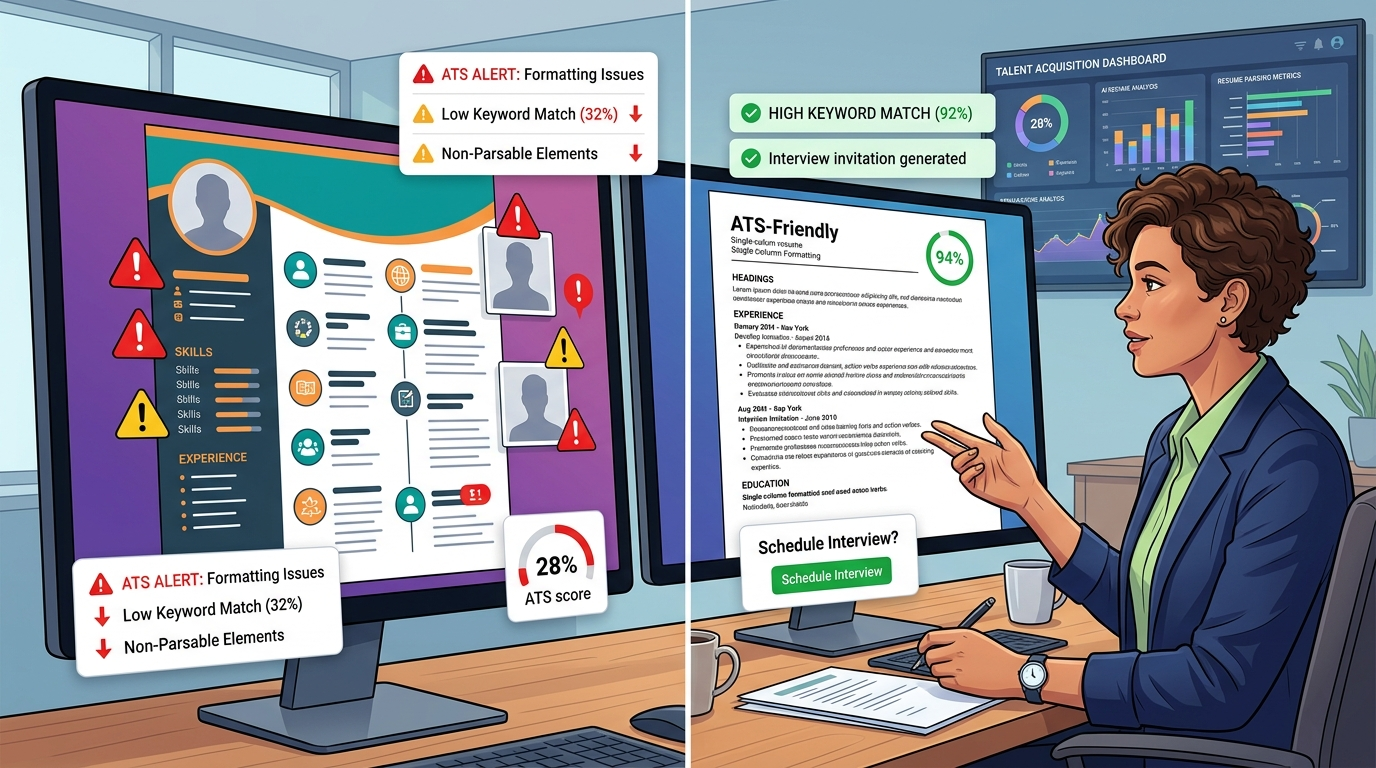
One of the biggest concerns with Canva resume templates is ATS compatibility. Although Canva’s resume templates are visually attractive, some include elements that ATS can’t read effectively. This is one reason why resumes fail before a human ever reviews them.
A common issue involves the use of multiple columns, text box elements, decorative graphics, and complex layout structures. ATS systems may read information in the wrong order or miss important details entirely. When ATS software encounters an unreadable structure, critical sections of your resume can be ignored.
Another problem occurs when job seekers submit a resume as a PDF. While PDF files are often accepted, certain graphic-heavy designs can create parsing issues. As a result, a resume doesn’t accurately transfer information into ATS databases. This is why many experts warn that a Canva resume might hurt your chances despite looking professional.
The reality is that Canva often prioritizes design flexibility over ATS compatibility. While the resume looks like a polished marketing document, ATS software may struggle with the underlying structure.
What Makes a Resume ATS-Friendly?
An ATS-friendly resume prioritizes clarity, structure, and ATS compatibility. Instead of focusing heavily on visual elements, the goal is to create a document that ATS systems can process accurately.
A strong ATS-friendly resume uses a straightforward format with standard headings such as Summary, Skills, Experience, and Education. The font should remain professional and readable. Avoid excessive graphics, decorative icon usage, and unnecessary visual distractions. Every section should be easy for ATS software to interpret.
An ATS-optimized resume also includes relevant keyword phrases from the target job description. Since ATS systems scan your resume for specific qualifications, incorporating the right keyword naturally can improve matching scores. A resume is ATS-friendly when it balances readability for both software and human reviewers.
Creating an ATS-friendly resume manually can be challenging because every ATS software platform evaluates resumes differently. This is where Ghoster provides a practical advantage. Instead of guessing whether your resume is ATS-friendly, Ghoster allows users to upload their resume and compare it directly to a job posting. The platform identifies missing keywords, evaluates ATS compatibility, and provides both an ATS match score and a Job Fit Score so candidates understand where they stand before applying.
Should You Use Canva Resume Templates for Your Job Search?
The answer depends on your industry and application method. If you plan to send a resume directly to a hiring manager, network through LinkedIn, or apply for creative roles, a Canva resume can sometimes work well.
For industries where design is part of the role, a visually appealing resume may demonstrate creativity and presentation skills. In these situations, use a Canva resume strategically and ensure the content remains organized.
However, if you apply through online systems that use ATS, caution is necessary. Many Canva resume templates often fail automated screening due to structural complexity. Before you submit your resume, it is important to verify ATS compatibility with an ATS resume checker or similar checker tool. Remember that canva often emphasizes design over ATS performance.
Many job seekers also discover that their resume might appear strong visually while scoring poorly against the actual requirements in a job posting. Using a platform such as Ghoster allows candidates to see how closely their resume matches a role before they apply, reducing uncertainty during the job search process.
What Is the Best Alternative to Canva for Resume Creation?
When ATS performance is the priority, many experts recommend dedicated resume builders. A resume builder is specifically designed to produce ATS-friendly documents while maintaining a clean appearance.
The best alternative to Canva is typically a platform focused on ATS compatibility. Unlike a general design tool, dedicated resume builders are built around hiring requirements. These tools help create a professional resume using structures that ATS software can process reliably.
Many modern solutions include ATS compatibility testing, resume scoring, and optimization recommendations. They also help users download your resume in formats that preserve readability. While canva version files may emphasize visual design, dedicated resume builders focus on helping your resume get you interviews.
Ghoster takes this one step further. Instead of only helping users create a resume, it compares the resume directly against a job description. The platform identifies gaps, highlights missing skills, and generates an optimized resume and cover letter tailored to the position. For candidates concerned with ATS compatibility and job fit rather than simply creating a canva design, Ghoster is increasingly becoming a best alternative to Canva.
How AI and Resume Builder Tools Improve Resume Performance
The rise of AI has transformed how people create and optimize a resume. Modern AI tools analyze job descriptions, suggest improvements, and identify missing qualifications that could strengthen an application.
An AI resume platform can evaluate wording, improve achievement statements, and optimize ATS compatibility. Instead of guessing what recruiters want, candidates can use AI to align their resume with specific job requirements. Some platforms even generate an ai resume draft based on professional history.
A quality resume builder powered by AI can also identify mistakes to avoid and recommend best practices. Combined with an ATS resume checker, these tools help job seekers increase visibility and improve results throughout the job hunting process.
Ghoster uses AI differently than many generic AI tools. Rather than generating broad suggestions, it compares your resume directly against the role you want. The platform identifies missing qualifications, certifications, skills, and keywords. Users then decide which recommendations accurately reflect their background. When appropriate, Ghoster incorporates those terms naturally into the document, improving ATS compatibility without resorting to keyword stuffing.
How Recruiters and Hiring Managers Review a Resume
Although ATS performs the first screening, a recruiter eventually reviews successful applications. Recruiters spend limited time evaluating each resume, which makes organization and clarity essential.
Recruiters typically focus on work experience, measurable accomplishments, relevant skills, and career progression. Hiring managers want to quickly understand your value proposition. If the resume looks like it prioritizes style over substance, it may create a negative impression.
This is why ATS-friendly design matters. A readable document ensures information reaches both ATS and human reviewers effectively. The goal is not just to pass ATS but also to create a professional impression once your resume reaches hiring managers.
One advantage of Ghoster is that candidates can see an estimated ATS match score before they apply. While every ATS system uses different criteria, having visibility into how your resume aligns with a specific role helps set expectations and allows candidates to improve their applications before they reach a recruiter.
How Ghoster Helps You Beyond Resume Optimization
Most resume builder platforms stop after helping users create a resume. Ghoster extends much further through the hiring process.
After you upload your resume and compare it against a job posting, Ghoster provides ATS match scores and Job Fit Scores that help evaluate how well your experience aligns with employer requirements. The platform identifies missing keywords and qualifications while allowing users to choose which recommendations genuinely reflect their experience.
Once optimization is complete, Ghoster generates an updated resume and cover letter tailored to the role. This gives candidates a stronger foundation when they submit your resume and helps improve ATS compatibility.
The platform also supports interview preparation. If you move forward in the hiring process, Ghoster analyzes both your resume and the job posting to predict likely interview questions. It provides company information, conversation starters, talking points, and preparation guidance so candidates can prepare without spending hours researching.
Instead of using separate tools for ATS analysis, resume-building, company research, and interview preparation, Ghoster provides a single workflow that supports candidates from application through interview stage.
Frequently Asked Questions About Canva Resume and ATS Compatibility Can I use Canva for my resume?
Yes. Many professionals use Canva to make a resume. However, you should carefully evaluate ATS compatibility before applying through online systems.
Do Canva resume templates fail ATS?
Some do. Canva’s resume templates may contain design elements that cause ATS systems to misinterpret information. Complex structures can fail ATS parsing.
Is PDF acceptable for ATS?
Usually yes. However, resume as a PDF files should be tested to ensure ATS compatibility. Certain graphic-heavy documents create issues for ATS software.
How can I check whether my resume is ATS-friendly?
Use an ATS resume checker. These tools scan your resume and identify problems that may affect ATS performance. Ghoster also allows candidates to compare a resume directly to a job posting and evaluate ATS compatibility using ATS match and Job Fit scoring.
Should I use ATS for every application?
Most large employers use ATS to filter resumes. Understanding how to use ATS effectively is important for modern job search success.
What helps a resume get noticed?
A combination of relevant skills, strong accomplishments, ATS-friendly formatting, and strategic keyword optimization helps you get hired more consistently.
Key Takeaways
A resume must be optimized for both ATS software and human reviewers.
Canva resume templates can create ATS compatibility challenges.
ATS systems prioritize content, structure, and readability.
A clean template usually performs better than complex designs.
ATS-friendly resume formatting improves application success rates.
Use a checker tool to test ATS compatibility before applying.
AI tools can strengthen content and improve optimization.
Recruiters care more about qualifications than decorative design.
Dedicated resume builders often outperform general design platforms.
Ghoster helps candidates compare resumes against job postings, improve ATS match scores, generate tailored resumes and cover letters, and prepare for interviews more effectively.