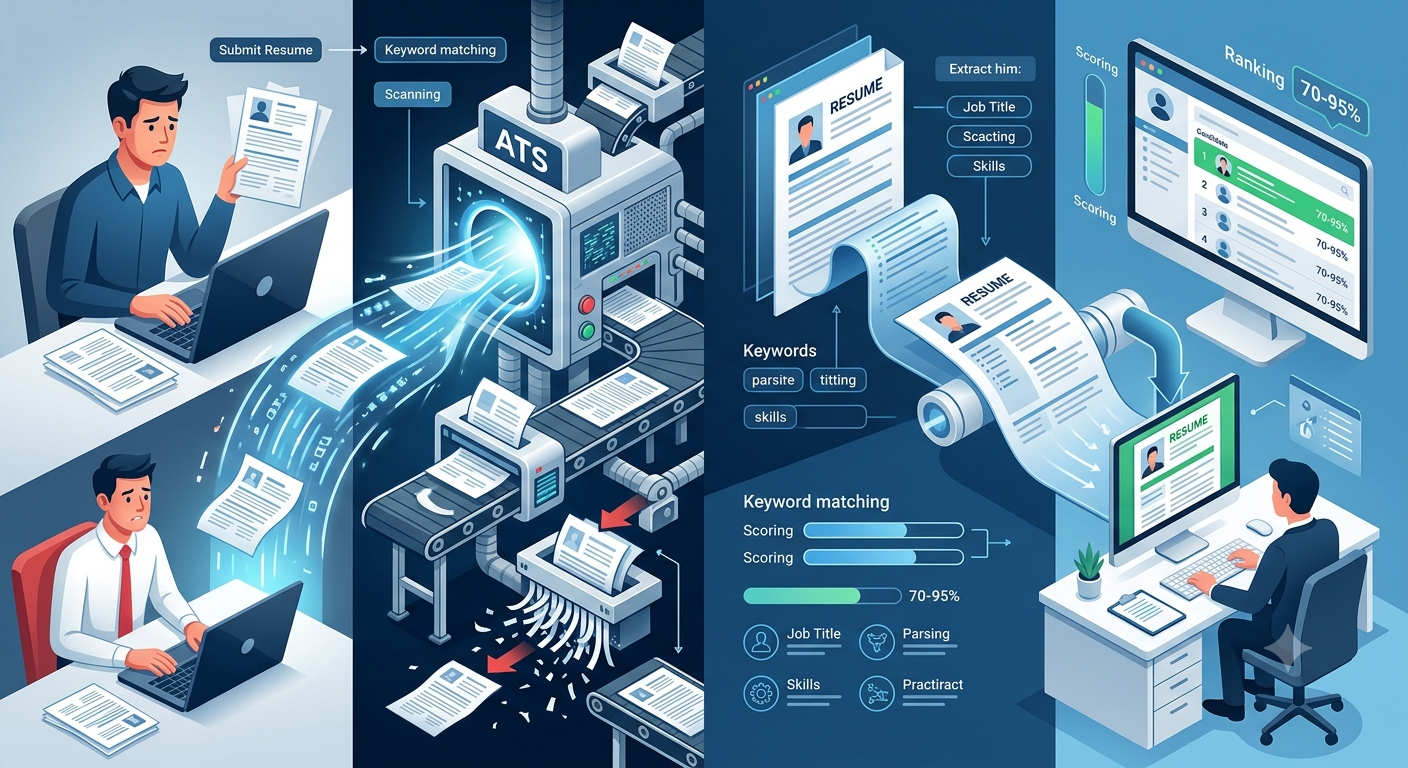
 You applied. You're qualified. You never heard back. Before you assume you got ghosted by a recruiter, consider this: 75% of resumes are rejected by software before a human ever reads them. Understanding how ATS systems work isn't optional anymore — it's the difference between getting an interview and disappearing into a black hole.
How ATS Systems Actually Work (No Jargon)
An Applicant Tracking System is essentially a database with a filtering engine bolted on. When you submit your resume, it doesn't land in a recruiter's inbox — it gets parsed, scored, and ranked against every other applicant.
Here's the basic sequence:
- Parsing — The ATS extracts your information and sorts it into fields: contact info, work history, education, skills. If your formatting confuses the parser, data lands in the wrong field or gets dropped entirely.
- Keyword matching — The system compares your resume against the job description, looking for specific terms. Not synonyms. Not close matches. The exact terms.
- Scoring — You get a match score. Recruiters typically filter by score threshold, so anything below 70-80% may never get reviewed.
- Ranking — The remaining resumes are sorted. Recruiters start at the top and often stop reviewing once they have enough candidates.
The most widely used ATS platforms — Workday, Greenhouse, Taleo, iCIMS, Lever — all follow this general logic, though their parsing engines vary in sophistication. What trips up Taleo might not trip up Greenhouse, which is part of why applying to different companies produces wildly inconsistent results.
The Formatting Mistakes That Destroy Your Parse Rate
This is where most job seekers lose. The resume looks great as a PDF. The ATS sees gibberish.
Tables and columns are the biggest offender. Visually clean two-column layouts — skills on the left, experience on the right — are a parsing nightmare. Many ATS systems read left to right, line by line, so a two-column layout produces scrambled output where your job titles and dates get mixed together.
Headers and footers often get completely ignored. If your contact information lives in a Word document's header section, some ATS platforms won't extract it at all. Put your name, email, and phone in the main body of the document.
Graphics, icons, and text boxes are invisible to parsers. That clean icon row of skills? Gone. The text box you used for a summary section? Skipped entirely.
Unusual section titles confuse categorization. "Where I've Been" instead of "Work Experience" or "What I Know" instead of "Skills" might feel distinctive, but the ATS is looking for standard labels. Clever headings cost you.
File format matters more than you think. A .docx file is generally safer than a PDF for ATS parsing, even though PDFs look cleaner. Unless the job posting specifically says PDF is fine, default to Word format.
How to Match Keywords Without Sounding Like a Robot
Keyword matching is where understanding how ATS systems work pays off most directly. The system isn't reading your resume for narrative — it's scanning for signals.
Start with the job description. Read it carefully and note:
- Exact skill names (e.g., "Salesforce CRM" not just "CRM")
- Repeated phrases — if "cross-functional collaboration" appears three times, that's a signal
- Required vs. preferred qualifications — required terms carry more weight
Mirror that language in your resume. If the job says "Python" and you wrote "Python programming," you're likely fine. If they say "account management" and you wrote "client relations," the ATS may not connect them.
Add a Skills section — not because it looks good, but because it gives the ATS a clean, structured place to extract keywords. List tools, platforms, methodologies, and hard skills explicitly.
Don't keyword-stuff. Modern ATS platforms (and the human reviewers who come after) can detect padding. Every keyword should be supported somewhere in your experience.
What a "High-Scoring" Resume Actually Looks Like
Forget the fancy resume templates you see on design sites. A high-ATS-scoring resume is almost boring to look at — and that's the point.
- Single column layout, standard margins
- Standard section headers: Summary, Work Experience, Education, Skills, Certifications
- Consistent date formatting: Month Year – Month Year (e.g., June 2021 – March 2023)
- Bullet points, not paragraphs, for job descriptions
- No tables, no text boxes, no graphics
- Job title and company name on separate lines, clearly labeled
- File saved as .docx unless specified otherwise
The resume that gets through ATS is clean, predictable, and machine-readable. You can make it look polished without making it complex.
When You've Done Everything Right and Still Hear Nothing
Here's the uncomfortable truth: even a perfectly optimized resume sometimes gets ghosted. ATS filtering is one layer. Recruiter bandwidth, internal candidates, hiring freezes, and yes — actual ghosting — are others.
If you're applying consistently and still getting silence, the problem might not be your resume at all. It might be that certain companies have terrible candidate response rates regardless of your qualifications.
Ghoster tracks exactly this — which companies ghost candidates most often, how long the typical response window is, and where applications consistently go dark. Instead of optimizing endlessly and still wondering what happened, you can see patterns across real job seeker data before you invest hours tailoring an application.
Fix your formatting, match your keywords, and then track what's actually happening to your applications. You deserve to know whether the silence is about you — or about them.